Summary of Music Production 2 Units
WORKFLOW
Learn how to move through Ableton Live.
Explore Live’s interface, views, and navigation tools. Learn to use the Browser, Presets, launch clips in Session View, arrange ideas in Arrangement View, and move between the two.
EXERCISES: Browser, Session into Arrangement, Editing Arrangements, One Track, Move Workflow
PROJECT: A/B Project
Make a piece of music with A and B sections in Live or on Move.
Students will use a prepared Ableton template containing pre-made audio and MIDI clips in Session View. Their objective is to arrange these clips into a structured piece with clear A and B sections in Arrangement View.
MIDI
Understand note events and how to generate material.
Create music using MIDI clips. Learn how to write melodies, harmonies, basslines, and drum patterns in the piano roll and stay in key with Scale Mode.
EXERCISES: Rhythm Workout (Live), Rhythm Workout (Move), Drum, Bass, Wildcard (Live), Drum, Bass, Wildcard (Move), Bass, Chords, Melody
PROJECT: Collaboration Project
Collaborate with another student to create a piece of music using MIDI tracks.
Students will be paired up to create a collaborative piece. Each student will take on different roles and work together to build musical ideas. Once ideas are drafted, students will combine their parts into a full arrangement with multiple sections. Throughout the process, students are expected to communicate regularly, give and receive feedback, and make creative decisions together as a team.
AUDIO
Understand how audio moves within systems and how to shape sound.
Edit and manipulate audio clips in Arrangement View. Learn how to trim, fade, reverse, and transpose audio, while exploring recording, signal flow, and using effects like EQ, reverb, delay, and compression.
EXERCISES: Signal Flow, Record Audio, Frequency Spectrum, Space, Dynamics
PROJECT: Mixing Project
Take stems and improve the mix using audio effects and knowledge of signal flow.
Students will choose a R&B, Pop, or Dance Mixing template containing pre-recorded stems. Their goal is to improve the mix using audio effects like EQ, compression, panning, reverb, and delay. Students will monitor levels to avoid clipping and maintain headroom, and make adjustments to create a more balanced, clear, and dynamic mix.
FORM
Learn how to structure music with purpose.
Write a full piece of music based on intention, audience, and context. Use automation and SFX to create transitions and variation between different sections.
EXERCISES: Automation, Transitions
PROJECT: Midterm Project
Write a full piece of music, but first determine what you’re trying to express, who you want to hear it, and in what context. Then execute and describe why you made the choices you did.
Students will begin by answering key questions about their music: What do I want to express? Who is this for? Where or how would it be heard? Using these answers as a guide, they will compose a complete piece with clear structure. Throughout the process, students will make intentional musical choices that reflect their creative goals and explain how those choices support their message, audience, and context.
SAMPLING
Learn how to generate musical material with Samplers.
Explore how recorded sound can be turned into musical material. Learn to trim, tune, and manipulate samples using Simpler, Drum Sampler, and Drum Rack to build musical ideas without traditional instruments.
EXERCISES: Warping, Timeline Sampling, Simpler, Drum Sampler, Drum Rack Sampling, Sampling on Move (Move)
PROJECT: Sampling Project
Make a piece of music exclusively using samplers.
Students will create a full piece using only sampled sounds. They will record or select audio, then use Ableton Live’s Simpler, Drum Sampler, and Drum Rack to manipulate and transform samples. The project should show creative use of sampling tools to build a complete musical idea without traditional instruments or synths.
SYNTHESIZERS
Learn how to create a variety of sounds using subtractive synthesis.
Learn Subtractive Synthesis by exploring Drift. Combine waveforms, filters, envelopes, and LFOs to design custom sounds.
EXERCISES: Oscillators and Filters, Envelopes, LFOs, Drum Sounds, Copycat
PROJECT: Synthesizer Project
Make a piece of music exclusively using synthesizers.
Students will create a full piece using only synthesizers. They will combine oscillators and filters, use LFOs and envelopes to add movement, incorporate noise for percussion, and automate synth parameters to develop variations throughout the track.
FINAL PROJECT
Synthesize concepts from the entire course into one project.
Students demonstrate their ability to combine MIDI, audio, sampling, synthesis, and mixing techniques to produce a cohesive and expressive original work.
PROJECT: Final Project
Put it all together into a final artistic statement.
Students will integrate skills from previous units to produce a full original piece of music.This includes combining MIDI, audio, sampling, and synthesizer elements to build compelling musical layers. Students will apply mixing techniques to create a polished, cohesive mix. Throughout the project, students are encouraged to make intentional artistic choices that reflect their personal style and musical vision, culminating in a final work that communicates a clear and unique creative statement.
Key Concepts, Exercises, and Projects
Key Concept:
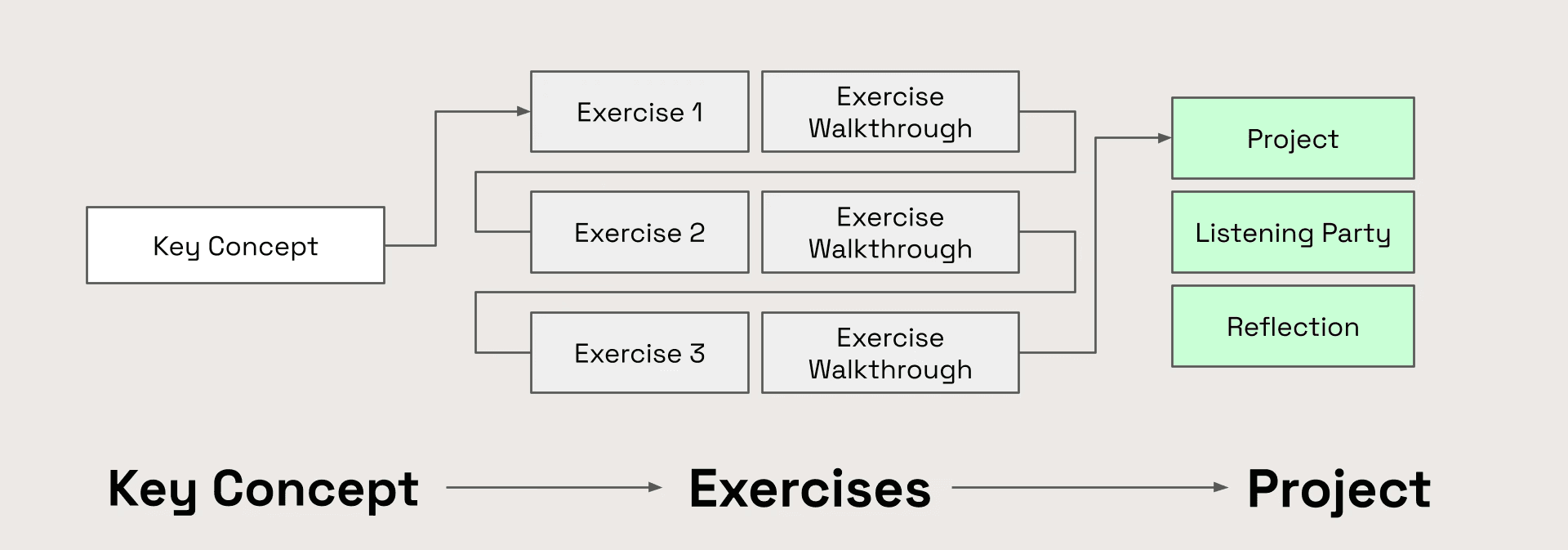
Each unit begins with a Key Concept Video that provides a bird’s eye view of the central idea for that unit.
Exercises:
Each exercise utilizes a template and prompts students to work on specific skills. Ricky, L.Dre, Sanaya, and Lawrence demonstrate how to complete the exercises in accompanying demonstration videos. Exercises are followed by checklists that outline necessary tasks.
After completing an exercise, the class will participate in an exercise walkthrough where one student shows how they completed the tasks. Exercise walkthroughs are described in detail [here (add link)]
Projects:
After completing the exercises, students will synthesize those skills into a larger project. While some of the projects have templates, Students will start from scratch for the majority of the projects, though a few have templates.
Like all projects throughout YPG curricula, these projects should end with listening parties as described on the Exercise Walkthroughs and Listening Parties page.
Unit Flow Map
Each unit follows the sequence below:
Exercise Flow Map
Each exercise follows the sequence below:

Exercise Demo: Lawrence, Ricky, Sanaya, and L.Dre show you how to complete the exercise.
Glossary: All terms from the video are clearly defined.
Exercise Reviews: Additional diagrams, readings, audio examples, etc. provide further depth and context to the information conveyed in the exercise demonstrations.
Step-By-Step: Students should refer to this page as they work. It contains instructions for the exercise, a download link for the template, and step-by-step guidance on executing the tasks required.
Assessment: Essential tasks are outlined in the exercise checklist and students will answer questions.
Exercise Walkthrough: Culmination of the exercise. See Exercise Walkthroughs and Listening Parties for more details.